Someone small needs you
A toddler melts down, the baby monitor lights up. Step out, handle it, come back — no scramble, no explaining yourself mid-sentence.
AwayCam loops a short, natural clip of you at your desk — so you can grab a coffee, calm a toddler, or just breathe — while your camera presence stays steady and completely under your control.
No cloud · No accounts · No telemetry · Your face never leaves your Mac
It’s a loop of you, recorded by you. Not a face-swap, an avatar, or a deepfake — and it never pretends you’re listening when you’re speaking.
A guided 3–15s capture of you at your desk, from your own webcam. Stored only on this Mac — never uploaded.
In Zoom, Meet, Teams, or FaceTime, choose AwayCam as your camera — exactly like any other webcam.
One click — or a hotkey — swaps your live feed for the loop. Come back, switch to Live. Calm and seamless.
Not for hiding — for being human on a day full of calls. A short break shouldn’t cost you your seat at the table.
A toddler melts down, the baby monitor lights up. Step out, handle it, come back — no scramble, no explaining yourself mid-sentence.
Five calls, back to back to back. Refill the water, use the bathroom, breathe for thirty seconds — without ever going dark on the one that’s running.
An hour of being watched is exhausting. On a long all-hands where you’re not speaking, drop the performance and just listen — face relaxed, off the hot seat.
Life doesn’t pause for your calendar. The knock, the bark, the package that needs a signature — handle the ninety-second interruption without making it everyone’s business.
The moment you need to absorb a hard question instead of performing attentiveness — pull your eyes off the lens, work it out, and answer like a person, not a headshot.
Refill the coffee, roll your shoulders, look out a window. Little breaks are how you make it through the day — AwayCam just keeps your seat warm while you take them.
Live is your real feed. Away plays your loop. Standby shows a clean “paused” frame. Move between them from the menu bar, a global hotkey, or automatically.
Explore every feature →Click a mode — this is the switch you’ll make in any meeting app.
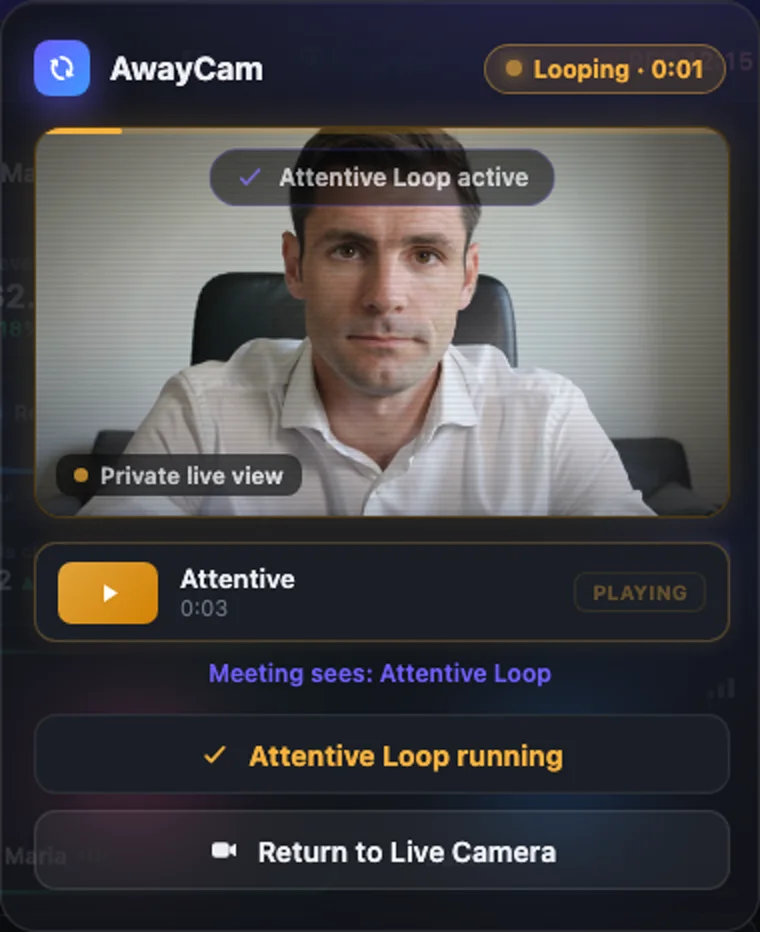
No windows to manage, no dashboard to learn. Click the AwayCam icon, and everything is right there — a private preview, your loops, and a single button to switch.
Tools that “keep you on camera” with cloud AI send your face to a server. AwayCam never does — your camera, audio, and loops never leave your Mac. Its only network use is checking for its own signed updates, and you can verify that with a network monitor.
Read the privacy promise →Not if it’s done right — which is the whole point. Pro adds the small human imperfections of a real call (subtle lighting drift, occasional connection hitches, timing jitter) so a flawless-and-frozen feed never gives itself away. And Pro’s Speaking safeguard won’t let you get caught the wrong way: it warns you the instant you start talking while Away.
Any app with a camera picker — Zoom, Google Meet, Microsoft Teams, Slack, FaceTime, and more. AwayCam appears as a normal camera called “AwayCam Camera”; you just select it like any webcam.
No. Your camera, audio, and recorded loops are never transmitted — AwayCam’s only network use is checking for its own signed updates. Everything is recorded, stored, and played back entirely on your Mac. No cloud, no accounts, no telemetry — and you can confirm it with a network monitor.
No. AwayCam only ever replays a short clip you recorded of yourself — it never generates, morphs, or models your face. It’s a loop of you, by you, and it’s built to be used honestly: for camera fatigue and quick breaks, not deception.
No — it installs like any normal Mac app. Download, drag it to Applications, and open it; because it’s signed and notarized by Apple, it opens cleanly with no “unidentified developer” warning. The only extra step is a one-time macOS approval to switch on the AwayCam camera — the same permission any virtual camera needs — and the app walks you through it the first time.
The core “step away” workflow is free forever. Pro — unlimited loops, realism, automation, and a higher-quality feed — is $4.99/month, $34.99/year, or $69.99 once for good, with a 7-day free trial that needs no card. macOS 14 or later, Apple Silicon and Intel.